June 3, 2026
· 9 min readBackend-for-Frontend (BFF): The Missing Piece in Your Fullstack App
Your frontend is doing too much — orchestrating microservices, parsing messy payloads, and worst of all, holding auth tokens the browser can't keep safe. The Backend-for-Frontend pattern moves all of that to a server layer you control. Here's why it matters (especially after the September 2025 npm attack that hit packages with 2.6B weekly downloads) and how Next.js gives you one for free.
In September 2025, attackers hijacked a maintainer's npm account and pushed malicious versions of debug, chalk, and 16 other packages — utilities with a combined 2.6 billion weekly downloads. The payload silently rewrote crypto wallet transactions inside the browser. Source: Sonatype, Qualys.
Here's the uncomfortable takeaway: if a transitive dependency you've never heard of can run arbitrary JavaScript in your page, then any auth token sitting in localStorage is already gone. That's the problem the Backend-for-Frontend pattern exists to solve.
The Problem: ShopCore's Frontend Is Doing Too Much
Imagine ShopCore, a typical e-commerce SPA. To render a single product dashboard, the frontend has to:
- Call the catalog service for product data — which returns a 2MB JSON blob to display one price.
- Call the inventory service on a different domain — cue a CORS preflight battle.
- Call the reviews service, then the user service, then the recommendations service — four more round trips before the page paints.
- Store the OAuth access and refresh tokens somewhere the JavaScript can reach them, so it can attach
Authorizationheaders to all of the above.
So the frontend is now a data orchestrator, a payload trimmer, a CORS negotiator, and a token vault — all running in the most hostile environment on the internet.
Sound familiar? That's exactly where the BFF pattern comes in.
What a BFF Actually Is
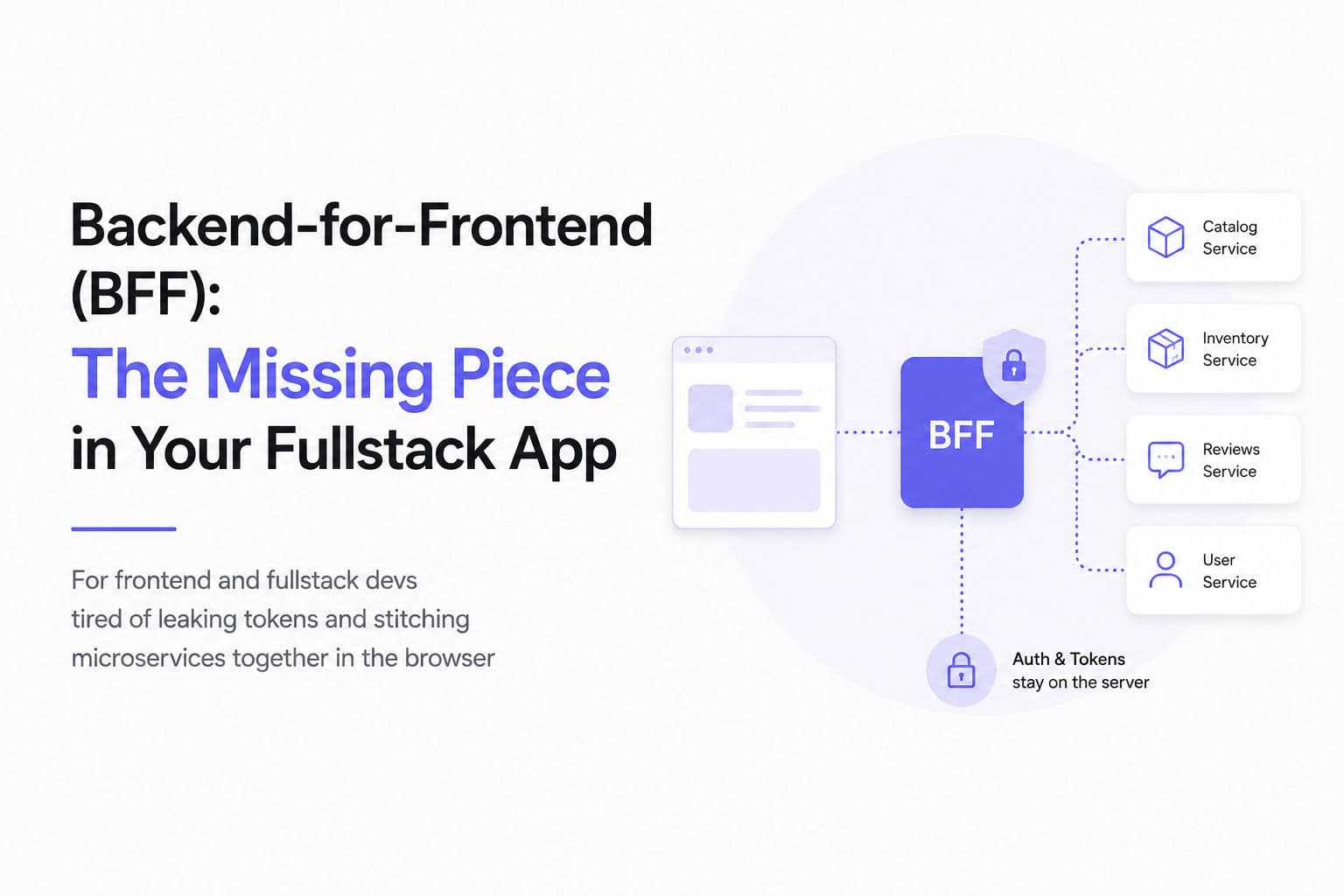
The Backend-for-Frontend (BFF) is a dedicated server layer that sits between your frontend and your upstream services. Instead of letting the browser talk to five microservices directly, the BFF becomes a specialized adapter that:
- Aggregates data from multiple services into a single round trip.
- Shapes responses down to exactly what the UI needs — no more, no less.
- Manages authentication and tokens entirely on the server.
The key word is dedicated. A BFF isn't a general-purpose gateway shared by everyone; it's tailored to one client. In a mature setup you might run one BFF for the web app and a separate, leaner one for mobile, each handing back an optimized payload.
Why You Need One
1. Curing the Data-Fetching Headache
Talk to microservices directly and you hit two opposite problems:
- Overfetching — an endpoint returns a giant payload just so you can show a username.
- Underfetching — you fire four separate requests to four services to render one screen.
Both drain mobile batteries, add latency, and bloat your frontend with orchestration logic that has nothing to do with UI.
A BFF collapses all of that. It fans out to the upstream services server-side, filters the noise, and returns one clean payload built for the screen. Next.js Route Handlers are explicitly designed for this — they can transform, filter, and aggregate data from one or more sources, which keeps logic out of the frontend and avoids exposing internal systems.
2. Bulletproof Security (and Surviving Supply-Chain Attacks)
This is the real argument. The browser is a hostile environment — anything your JavaScript can read, an attacker's injected JavaScript can read too.
The September 2025 npm incident proved this isn't theoretical. The malicious code didn't exploit a clever bug; it just ran in the page like any other dependency and read what it wanted. The attack affects all JavaScript developers and applications, regardless of cryptocurrency involvement — the crypto payload was incidental. The vulnerability was that browser-side code can read browser-side secrets.
So where do most apps put auth tokens? localStorage, sessionStorage, or in-memory variables. All three are readable by any script on the page.
The BFF flips this. It treats the browser as untrusted and acts as a secure vault:
- It runs as a confidential client, authenticating with the authorization server using a client secret the browser never sees. 🔒
- It keeps OAuth access and refresh tokens in a server-side session.
- The browser only ever receives an opaque session ID inside an
httpOnly,securecookie — which JavaScript cannot read.
The result: there are simply no tokens in the browser to steal. An XSS payload or a poisoned dependency can still misbehave, but it can't walk away with your refresh token.
🔒 Key idea: An
httpOnlycookie is invisible todocument.cookie. The browser attaches it automatically on requests to your origin, but no script can read its value.
3. Bypassing CORS
When the frontend talks to services on different ports and domains, you configure CORS for each one — and fight cross-origin cookie rules the whole way. Proxy everything through a BFF that shares the same origin as your frontend, and cross-origin headaches mostly disappear. Same-origin requests don't need CORS at all.
Building a BFF the Modern Way (Next.js)
Here's the good news: if you're on Next.js, you already have a BFF — you don't need a separate Express or Go server. Next.js officially supports the pattern. Next.js supports the "Backend for Frontend" pattern, letting you create public endpoints to handle HTTP requests and return any content type, not just HTML.
Two primitives do the work: Server Components and Route Handlers.
The Old Way — Fetching in the Browser
// ❌ Client component: orchestration + token exposure in the browser
'use client'
import { useEffect, useState } from 'react'

export default function Dashboard() {
  const [data, setData] = useState(null)

  useEffect(() => {
    const token = localStorage.getItem('access_token') // 💀 readable by any script
    Promise.all([
      fetch('https://catalog.api/products', { headers: { Authorization: `Bearer ${token}` } }),
      fetch('https://inventory.api/stock',   { headers: { Authorization: `Bearer ${token}` } }),
      fetch('https://reviews.api/list',      { headers: { Authorization: `Bearer ${token}` } }),
    ]).then(/* ...stitch it all together client-side... */)
  }, [])

  return <div>{/* ... */}</div>
}
The New Way — Aggregate in a Server Component
// ✅ Server component: runs on the server, no token ever reaches the client
import { cookies } from 'next/headers'

async function getDashboardData() {
  const session = (await cookies()).get('sid')?.value // opaque session id
  const token = await resolveTokenFromSession(session)  // stays server-side

  const [products, stock, reviews] = await Promise.all([
    fetch('https://catalog.api/products', { headers: { Authorization: `Bearer ${token}` } }).then(r => r.json()),
    fetch('https://inventory.api/stock',   { headers: { Authorization: `Bearer ${token}` } }).then(r => r.json()),
    fetch('https://reviews.api/list',      { headers: { Authorization: `Bearer ${token}` } }).then(r => r.json()),
  ])

  // Shape it: return only what the UI needs
  return products.map(p => ({
    id: p.id,
    name: p.name,
    price: p.price,
    inStock: stock[p.id] ?? 0,
    rating: reviews[p.id]?.average ?? null,
  }))
}

export default async function Dashboard() {
  const items = await getDashboardData()
  return <ProductList items={items} /> // client gets a clean, minimal payload
}
Real-world benefit: the token never leaves the server, the three upstream calls collapse into one server round trip, and the client component receives a payload trimmed to five fields instead of three raw blobs.
Handling Login — A Route Handler as a Confidential Client
Route Handlers are your public, controllable endpoints. Use one to receive a token from your identity provider and set the httpOnly cookie — a pattern lifted straight from the Next.js docs:
// app/auth/callback/route.js
import { NextResponse } from 'next/server'

export async function GET(request) {
  const token = request.nextUrl.searchParams.get('session_token')
  const redirectUrl = request.nextUrl.searchParams.get('redirect_url')

  const response = NextResponse.redirect(new URL(redirectUrl, request.url))

  response.cookies.set({
    name: '_token',
    value: token,
    path: '/',
    secure: true,
    httpOnly: true,   // 🔒 invisible to client-side JavaScript
    expires: undefined, // session cookie
  })

  return response
}
Breaking it down:
httpOnly: true— the single most important line. Client-side JS can never read this cookie.secure: true— the cookie is only sent over HTTPS.path: '/'— attached to every request to your origin, so the browser carries the session automatically.
💡 Tip: Next.js explicitly warns to use
POSTfor sensitive data so it doesn't end up in URLs — GET requests may be cached or logged, which could expose sensitive info. Keep tokens and credentials out of query strings.
Bonus: Shared Types in a Monorepo
If your frontend and BFF live in the same monorepo, centralize your TypeScript types in a shared package. Change an upstream response shape and the compiler flags every mismatch on both ends instantly — no more silent drift between client and server.
Server Components vs Route Handlers — Which One?
| Use case | Server Component | Route Handler |
|---|---|---|
| Render-time data fetching | ✅ Best fit | ⚠️ Adds an extra HTTP hop |
| Public API endpoint for clients | ❌ Not exposed | ✅ Best fit |
| Login / OAuth callback + set cookie | ❌ | ✅ Best fit |
| Webhooks from third parties | ❌ | ✅ Best fit |
| Proxying to an upstream backend | ❌ | ✅ Best fit |
| Client-only data (geo, polling) | ❌ | ⚠️ Use with SWR / React Query |
The Next.js docs are blunt about one trap: fetch data in Server Components directly from its source, not via Route Handlers — for on-demand components, fetching through a Route Handler is slower due to the extra HTTP round trip. Don't make your Server Component call your own API route; just hit the source.
The Tradeoffs
A BFF isn't free. Be honest about what you're signing up for:
- More complexity — a new layer means more code, duplicate error handling, and session/cookie state to keep in sync.
- An extra network hop — every client call now goes through the BFF before reaching the real service.
- A single point of failure — your BFF is now critical infrastructure. If it falls over, the whole frontend goes dark.
If you're building a simple app on top of one well-structured REST API, a BFF is probably overkill. The pattern earns its keep when you have multiple upstream services or sensitive auth flows — and most real apps eventually have both.
Final Thoughts
The BFF pattern isn't a "nice-to-have" abstraction anymore. For anything touching sensitive data, it's a security necessity:
- Token safety — no auth tokens in the browser means nothing for a poisoned dependency to steal.
- Clean payloads — aggregate and shape data server-side; ship the UI only what it needs.
- No CORS theater — same-origin requests just work.
And if you're already on Next.js, you have the tools sitting right there in Server Components and Route Handlers.
👉 Audit your app today: if there's an access or refresh token anywhere a script can read it, move it behind a BFF before someone moves it for you.
FAQ
What is the Backend-for-Frontend (BFF) pattern?
A BFF is a dedicated server layer that sits between your frontend and your upstream backend services. It aggregates data, shapes responses for the UI, and manages authentication on the server so tokens never reach the browser.
How is a BFF different from an API gateway?
An API gateway is a general-purpose entry point shared by all clients. A BFF is purpose-built for one specific frontend — you might run separate BFFs for web and mobile, each returning a payload optimized for that client.
Do I need a separate server to build a BFF?
No. If you use Next.js, you already have a BFF layer via Server Components and Route Handlers. You don't need to spin up a separate Express or Go service unless your needs outgrow the framework.
Why is storing auth tokens in localStorage dangerous?
Anything JavaScript can read in the browser, malicious JavaScript can read too. If an XSS payload or a compromised npm dependency runs in your page, it can read tokens from localStorage, sessionStorage, or in-memory variables and exfiltrate them.
Where does a BFF store tokens instead?
The BFF keeps OAuth tokens in a server-side session and hands the browser only an opaque session ID inside an httpOnly, secure cookie. JavaScript cannot read an httpOnly cookie, so there are no tokens in the browser to steal.
When is a BFF overkill?
If you're building a simple app backed by a single, well-structured REST API, a BFF adds latency and a single point of failure for little gain. The pattern pays off when you have multiple upstream services or sensitive auth flows.