March 24, 2026
· 11 min readKubernetes Isn't a Deployment Tool — It's a Reconciliation Engine
Most engineers treat Kubernetes like a fancier way to run containers. But that mental model will fail you when things break. This article walks through the control loop pattern, and every major Kubernetes component — pods, services, deployments, the scheduler, and ingress — through the lens of how Kubernetes actually thinks. Once you see it, you can't unsee it.
Watch this happen: you delete a running pod. Within seconds, a new one appears — different name, fresh timestamp, already serving traffic. You didn't trigger anything. No script ran. No CI pipeline fired. Something inside the cluster noticed a pod was missing and replaced it on its own.
What brought it back? What noticed it was gone? How did it know what to replace it with — and where to put it?
That's what this article is about.
TL;DR
- Kubernetes is a declarative state management system, not a deployment tool. You declare what should be true; controllers make it so.
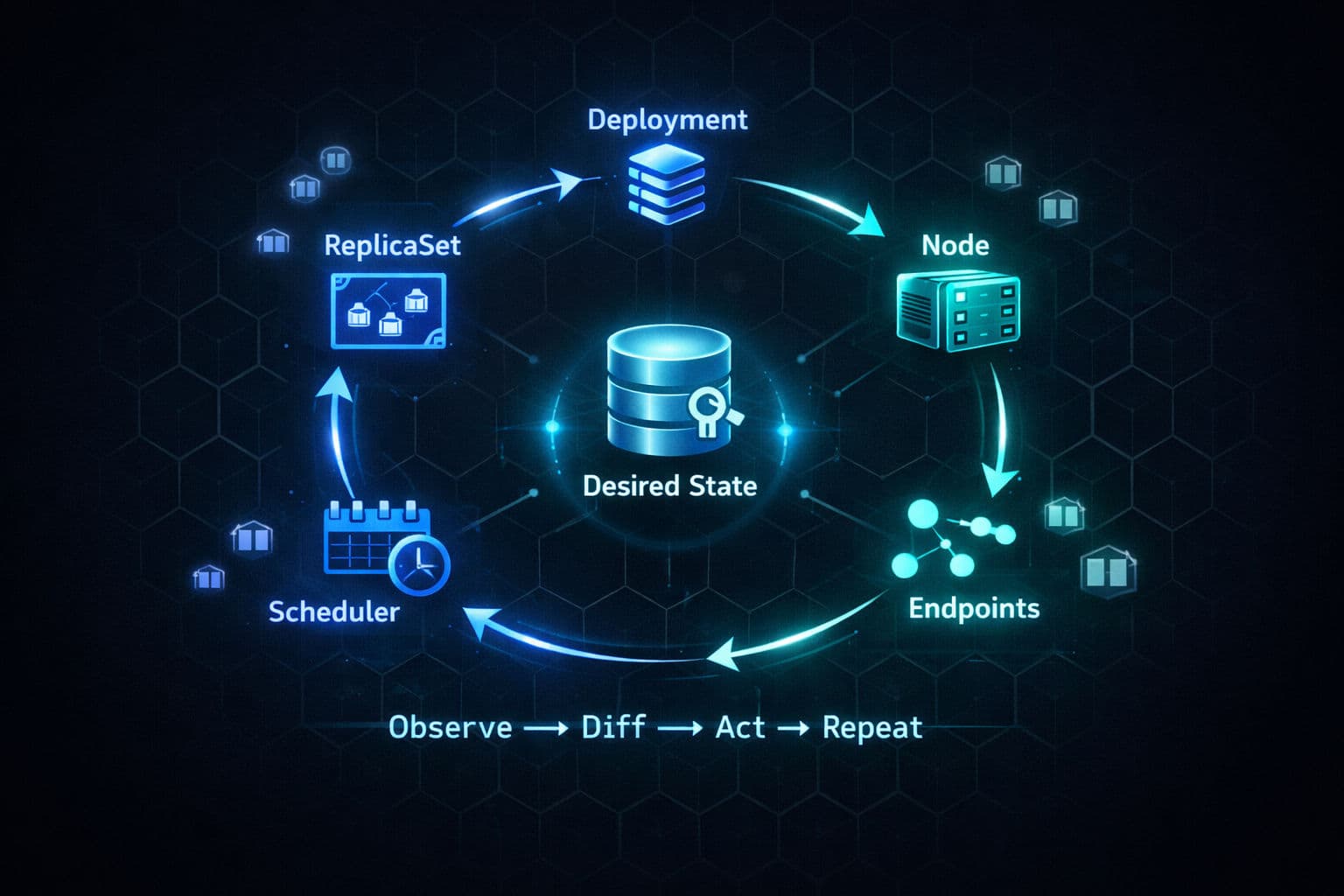
- The entire system is built on control loops: observe current state → compare to desired state → act → repeat forever.
- Pods are ephemeral atomic units. Services give them stable addresses. Deployments handle safe rollouts. The scheduler places pods on nodes. Ingress routes external traffic in.
- Every one of these components follows the same loop. Once you see the pattern, debugging Kubernetes becomes dramatically easier.
Why the Old Mental Model Fails You
Before Kubernetes, most engineers had a simple mental model for deployment: you have code, you have a server, you put the code on the server. Maybe you SSH in, pull from git, restart a process. You are the operator. You decide what runs where.
Kubernetes inverts this completely.
Most people try to use it with the old model — thinking of it as a fancy way to deploy containers. That works until something breaks, and then it completely fails you because it fundamentally misrepresents what Kubernetes is.
💡 Key shift: Kubernetes is a declarative state management system for infrastructure. You don't tell it how to do things. You tell it what you want to be true, and it continuously works to make reality match your description.
The Reconciliation Loop — The One Pattern That Explains Everything
This is the most important concept in Kubernetes, and it's the one most buried under YAML and tooling.
It's called a control loop (or reconciliation loop), and it works like this:
- Observe the current state of the world
- Compare it to the desired state (what you declared)
- Act to close the gap if they don't match
- Repeat forever
Think of a thermostat. You set 72°F. The system checks the current temperature. If they don't match, the heater acts. Someone opens a window — temperature drops — the heater turns back on. It doesn't run a one-time script. It continuously reconciles.
Kubernetes doesn't run one control loop. It runs dozens of them in parallel, each responsible for a single narrow concern:
| Controller | What it watches | What it does |
|---|---|---|
| ReplicaSet controller | ReplicaSets | Creates/deletes pods until count matches desired |
| Deployment controller | Deployments | Manages replica sets during rollouts |
| Node controller | Nodes | Marks pods for rescheduling when a node goes dark |
| Endpoints controller | Pods + Services | Keeps endpoint lists up-to-date |
| Scheduler | Unscheduled pods | Binds pods to nodes |
None of these controllers know about each other. They only watch their own objects. They all coordinate through a single source of truth: etcd, with the API server sitting in front of it.
# When you run this, you're not deploying anything.
# You're writing desired state into etcd.
kubectl apply -f deployment.yaml
The controllers notice the new desired state. They do the rest.
Level-Triggered, Not Edge-Triggered
There's a design choice that makes this system so resilient, and it's worth naming explicitly.
Kubernetes is level-triggered, not edge-triggered.
An edge-triggered system reacts to individual events: "a pod was just deleted", "a node just failed". If it misses an event, it loses track.
A level-triggered system doesn't care about what happened. It only cares about what's true right now.
If a controller crashes and misses 100 events, it doesn't matter. When it restarts, it reads the current state, sees the gap, and acts. The current state is the source of truth, not the event log.
⚠️ This is why Kubernetes self-healing isn't a feature bolted on. It's a natural consequence of the architecture. The control loop is the crash recovery code.
Pods — The Atomic Unit
If you're coming from Docker, your first question is: why do I need this extra abstraction? I already have containers.
Fair. And the answer isn't "because Kubernetes likes layers."
Kubernetes needs an atomic unit it can:
- Schedule onto a node
- Allocate CPU and memory to
- Health check
- Restart
- Replace
That unit is the pod.
In practice, the most common case is one container per pod. The multi-container pattern is for tightly coupled helper processes — your app server and its log-shipping sidecar, your web server and a local caching proxy — processes that need to share a network and storage and make no sense running on different machines.
Inside a pod, every container shares the same IP. Container A can call Container B on localhost. They see the same mounted files.
The operational reality of pods:
- They're ephemeral — designed to be destroyed and recreated freely
- If a container inside a pod crashes, the kubelet on that node restarts it (this is what
CrashLoopBackOffmeans — increasing delays between restarts) - If the pod itself is deleted, evicted, or its node dies — that pod is gone forever. The ReplicaSet controller creates a brand new pod with a new identity, new IP, possibly on a different node
# Events section tells the full story:
# scheduling, image pull, failures, restarts
kubectl describe pod <pod-name>
💡 Most debugging starts with
kubectl describe podand reading the Events section at the bottom.
Services — Stable Addresses Over Ephemeral Pods
This creates a problem. If pods are ephemeral and get new IPs every time they're recreated, how does anything find them?
You can't hardcode an IP. The pod might be dead in 5 minutes. You can't predict the next IP. The scheduler might put the replacement on a totally different node.
This is exactly what Services solve.
A service is a stable abstraction over a group of pods. It has a fixed IP and a DNS name that never changes no matter how many pods behind it are created or destroyed.
apiVersion: v1
kind: Service
metadata:
  name: backend-service
spec:
  selector:
    app: backend      # Routes to all pods with this label
  ports:
    - port: 80
      targetPort: 8080
The Endpoints controller watches for pod changes. When a new pod appears with matching labels, it gets added to the service's endpoint list. When a pod disappears, it gets removed automatically.
The three service types build on each other — they're layers, not alternatives:
ClusterIP      →  Internal-only IP, reachable within cluster
NodePort       →  Everything ClusterIP does + opens a port on every node
LoadBalancer   →  Everything NodePort does + asks cloud provider for a real LB
This layering exists because Kubernetes was designed to be infrastructure-agnostic. ClusterIP and NodePort work everywhere. LoadBalancer needs a cloud provider integration. The same service definition works in minikube and in production on AWS.
# Service not routing traffic? Check this first.
# If the list is empty, your label selectors don't match any running pods.
# 9/10 times: typo in the selector, or pods have different labels than you think.
kubectl get endpoints <service-name>
Deployments and ReplicaSets — Safe, Reversible Rollouts
A Deployment is where you express your desired state for a workload:
apiVersion: apps/v1
kind: Deployment
metadata:
  name: api-server
spec:
  replicas: 3
  selector:
    matchLabels:
      app: api-server
  template:
    spec:
      containers:
        - name: api
          image: my-api:v2   # Change this tag to trigger a rollout
          resources:
            requests:
              memory: "256Mi"
              cpu: "250m"
A Deployment doesn't manage pods directly. It manages ReplicaSets. The separation is what makes zero-downtime deployments possible.
When you change the image tag from v1 to v2:
At every point during the transition, pods are serving traffic. If the new version starts crashing — new pods won't become ready — so the Deployment controller won't continue scaling down the old ones. Your previous version keeps serving traffic.
# See exactly where a rollout is stuck
kubectl rollout status deployment/api-server

# Every revision and what changed
kubectl rollout history deployment/api-server

# Snap back to the previous ReplicaSet
kubectl rollout undo deployment/api-server
💡 Old ReplicaSets aren't deleted immediately. They're kept as rollback targets. By default, Kubernetes keeps the last 10 revision histories.
The Scheduler — One Binding Decision Per Pod
When a new pod is created, it doesn't have a home. It sits in Pending state. The scheduler's job: find the best node for this pod.
Two phases:
1. Filtering — eliminate nodes that can't possibly run the pod:
- Not enough memory or CPU
- Missing a required GPU
- Doesn't match node selectors or affinity rules
2. Scoring — rank the remaining nodes:
- Which gives the most balanced resource usage?
- Which already has the container image cached?
- Which best satisfies soft preference rules?
The highest-scoring node wins. The scheduler writes a binding object to the API server: "this pod belongs on node-3." That's it. The scheduler's entire output is one binding decision for one pod. Nothing else.
The kubelet on that node — running its own reconciliation loop, watching for pods assigned to it — picks it up, pulls the image, and starts the container.
# Pod stuck in Pending? This tells you exactly what the scheduler couldn't find.
kubectl describe pod <pod-name>
# Look for: Insufficient memory | No matching node selector | No nodes available
⚠️ The scheduler doesn't deploy anything. It doesn't start any processes. It doesn't SSH into any machine. It makes a binding decision and hands off.
Ingress — One Entry Point for the Outside World
If you gave each service its own LoadBalancer, you'd have a separate external IP and a separate cloud load balancer for every service you expose. Expensive and messy at scale.
Ingress solves this. One external entry point that routes requests to the right place based on URL.
apiVersion: networking.k8s.io/v1
kind: Ingress
metadata:
  name: api-ingress
spec:
  rules:
    - host: api.example.com
      http:
        paths:
          - path: /v1
            pathType: Prefix
            backend:
              service:
                name: api-v1-service
                port:
                  number: 80
          - path: /v2
            pathType: Prefix
            backend:
              service:
                name: api-v2-service
                port:
                  number: 80
An Ingress resource alone does nothing — it's just data in etcd. You need an Ingress controller (a pod running nginx, Traefik, or a cloud-specific implementation) that watches Ingress resources and configures its proxy to enforce the routing rules.
Same pattern as everywhere else: declare the what, a controller handles the how.
💡 Ingress is being gradually succeeded by the Gateway API, which supports more advanced routing like traffic splitting and header-based matching. If you're starting a new project, it's worth evaluating.
How a Real Request Flows Through the Whole System
Every component covered in this article is in that chain.
What Happens When a Node Dies
Node 3 goes down. Watch how five independent controllers collectively heal the system — with no master process orchestrating any of it:
- Node controller — kubelet stops sending heartbeats → marks node as
Unreachableafter ~40s, applies unreachable taint - Endpoint slice controller — removes unreachable pods from service endpoints → traffic stops going to the dead node (before pods are even replaced)
- Taint-based eviction — after toleration period (5 min default), pods are formally evicted
- ReplicaSet controller — notices count is off → creates replacement pods
- Scheduler — picks a healthy node for the new pods
- Kubelet — starts the containers on the new node
- Endpoint slice controller — adds new pods to the service → traffic flows again
No component told the system what to do. Five independent control loops, each following its own simple reconciliation pattern, collectively healed the cluster.
Production Checklist
- Never create pods directly — always use a Deployment. Naked pods have no controller watching over them.
- Set resource requests and limits on every container — the scheduler and eviction decisions depend on them.
- Use
kubectl describe podfirst when debugging — the Events section at the bottom is almost always where the answer lives. - Check endpoints before chasing service bugs —
kubectl get endpoints <name>. Empty list = label selector mismatch. - Use
kubectl rollout statusduring deployments to catch failures early. - Keep
revisionHistoryLimitat a sensible value (default 10) — old ReplicaSets are your rollback insurance. - Evaluate Gateway API over Ingress for new projects if you need traffic splitting or header-based routing.
Conclusion
I've found that most Kubernetes confusion — including most production incidents I've debugged — comes from thinking imperatively about a declarative system. You try to figure out "what happened" when the system doesn't track events; it tracks state.
Once you internalize the reconciliation loop, everything else clicks. Pods exist because containers need a shared network and an atomic unit. Services exist because pods are ephemeral. Deployments exist because rollouts need to be safe and reversible. The scheduler narrows the universe of possible node placements down to one binding decision. Ingress brings the outside world in through a single controlled entry point.
Every one of those is the same pattern: desired state in, reconciliation running, reality converging. That's the whole machine. Start thinking in those terms and Kubernetes stops feeling magical — it just becomes a well-designed system doing exactly what it promises.